Features

gLabels Plus features: free barcode and label design

gLabels Plus designs and prints labels with text, barcodes, QR codes and images, merges data from CSV files, includes over 1,800 label templates and 24 thermal printer presets, and organizes work into Projects. Every feature is free and works offline on Linux, Windows and macOS. An optional Claude chat panel can also design a label from a plain description.

Highlights

Built for people who print a lot of labels

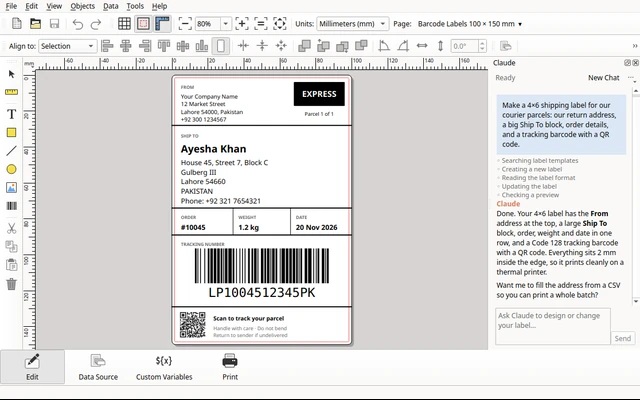
gLabels Plus with the Claude chat panel next to the editor: the user asked for a 4×6 shipping label and Claude built it with addresses, order details, a tracking barcode and a QR code

New in 5.1.4Design with Claude

Describe the label. Claude builds it.

Tell Claude what you need in plain words. It picks the label size, lays out text, barcodes, QR codes and symbols, checks a preview and fixes what doesn't fit, while you watch in the editor. Undo any step with Ctrl+Z.

Optional: uses Claude Code with your own Claude account. How it works

Tools > Connect AI > Claude · Ctrl+Shift+K chat panel
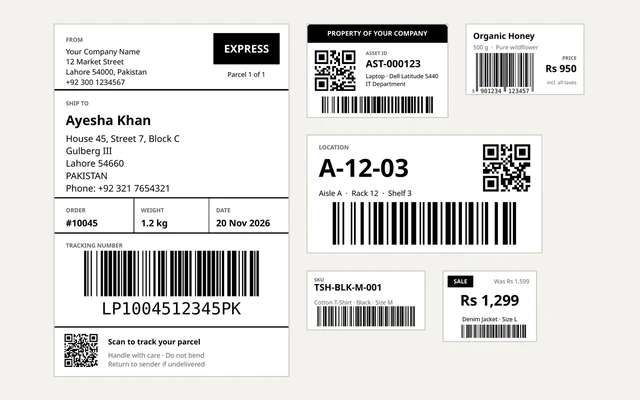
Sample labels: a 4×6 shipping label, an asset tag, a product label, a bin location label, a SKU label and a sale price tag

Sample label library

Start from a ready-made shipping label, receipt, invoice, SKU, product or asset label. Edit it, save it under a new name and print. The sample never changes.

File > New from Sample

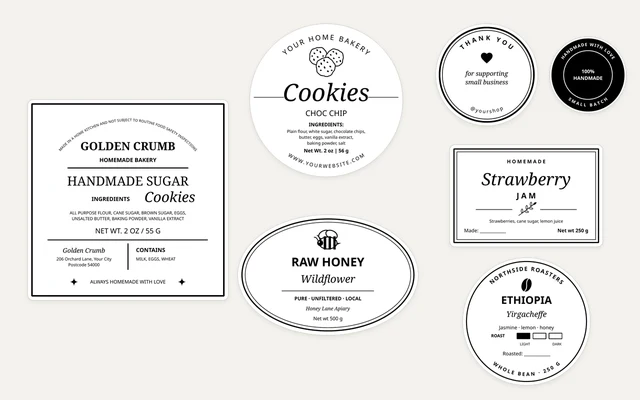
Black and white sticker samples: a square bakery label, a round cookie sticker with curved text, an oval honey label, a thank-you sticker, a handmade seal, a jam jar label and a round coffee label

Sticker labels

15 black and white stickers up to 4″ wide for cookies, bakery, jam, honey, candles, soap and coffee, with curved text on round labels. Made for thermal printers.

New from Sample > Stickers

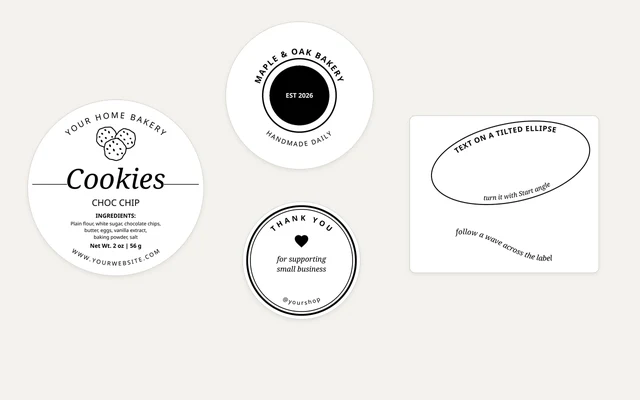
Round labels with curved text: a bakery name over the top and a website under the bottom, text around the outside of a circle logo, text on a tilted ellipse and on a wave

Curved text

Run text over the top or under the bottom of a round label, all the way round a circle, or along a shape you drew. Turn it with Start angle.

Text tab > Path · Objects > Put Text on Shape

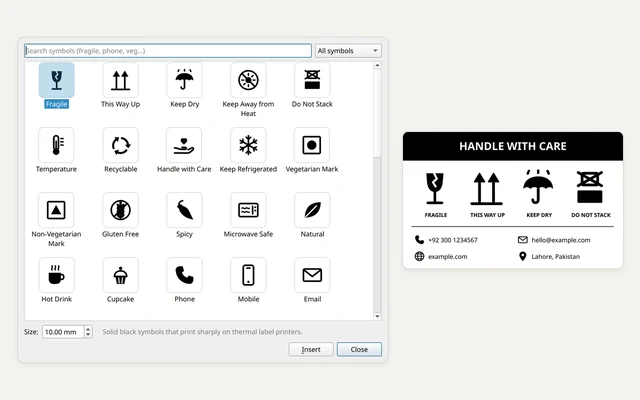
Insert Symbol window with handling, food and contact symbols, next to a carton label using Fragile, This Way Up, Keep Dry and Do Not Stack symbols and phone, email, website and location icons

Symbols for thermal labels

151 solid black symbols: Fragile, This Way Up, Keep Refrigerated, Vegetarian, phone, email, social media logos, delivery, check boxes and arrows. Sharp on thermal printers.

Tools > Insert Symbol Ctrl+Shift+Y

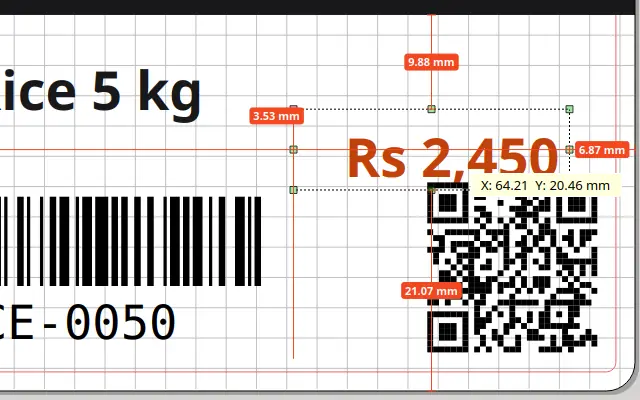
Smart guides showing red distance lines in millimeters while a price is dragged on a barcode label

Smart guides and snapping

Red lines show the distance to nearby objects and the label edge while you drag. Objects snap to edges and centers.

Hold Ctrl to turn snapping off

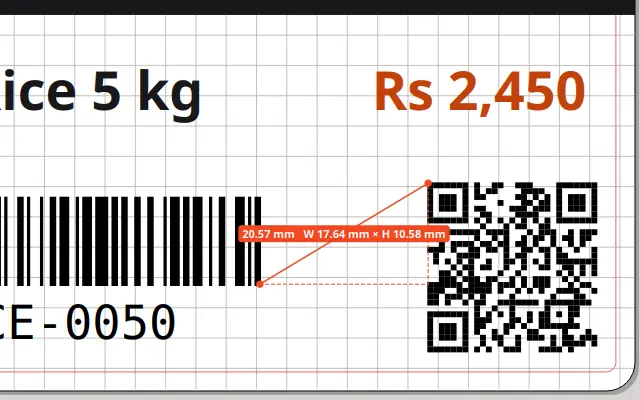
Measure tool showing the distance and width by height between a barcode and a QR code

Measure tool

Drag between any two points to measure. Diagonals also show width × height.

M to measure Shift keeps it straight

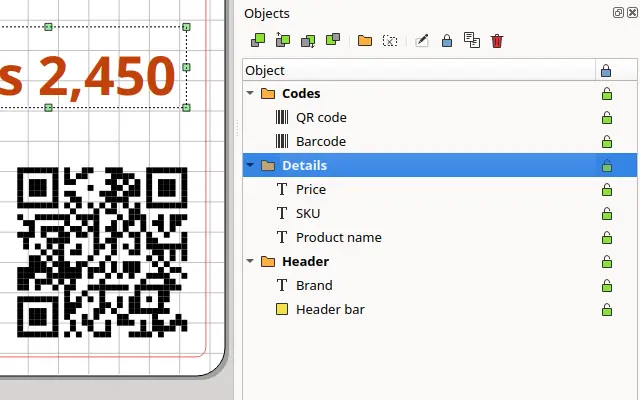
Objects panel with named objects organized into Codes, Details and Header groups

Layer groups and names

Name objects and group them in the Objects panel, then move, align or lock a whole group at once.

Ctrl+G to group F2 to rename

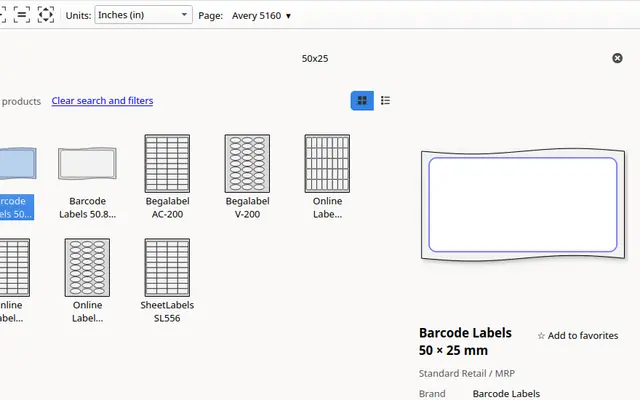
Product chooser opened from the Page button, searching for 50 × 25 mm labels

Page selector

Switch to another sheet or roll at any time. Objects keep their position and size.

Ctrl+Shift+P Page Setup

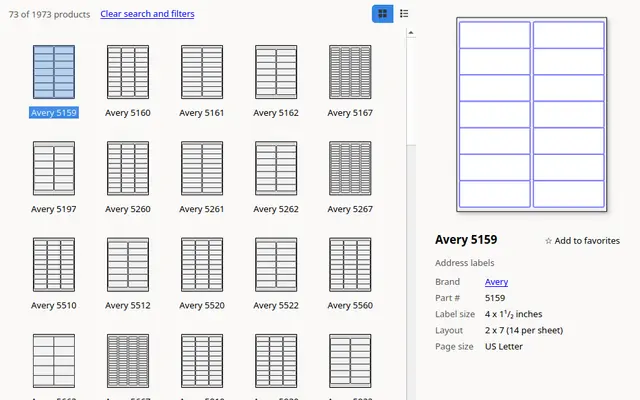
Product chooser listing Avery address label sheets with a layout preview

1,800+ label templates

Avery, Herma, Zweckform, Brother, Dymo, Uline and more. Search by brand, part number or size.

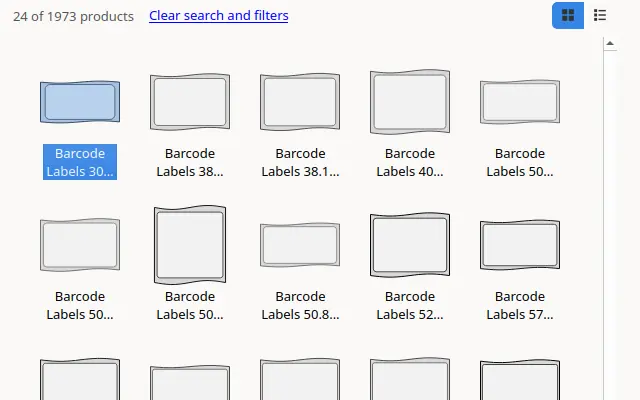
Barcode labels category showing thermal roll label sizes

Thermal roll presets

24 barcode label sizes for Zebra, TSC, Xprinter and Godex printers, from 30 × 15 mm to 4 × 6″.

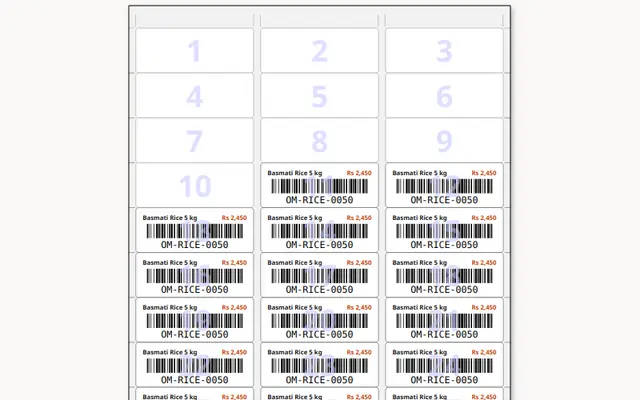
Print preview of a partly used Avery sheet where printing starts at label 11

Precise printing

Click a label in the preview to start on a partly used sheet. Outlines, crop marks, mirror and PDF.

Ctrl+P Print

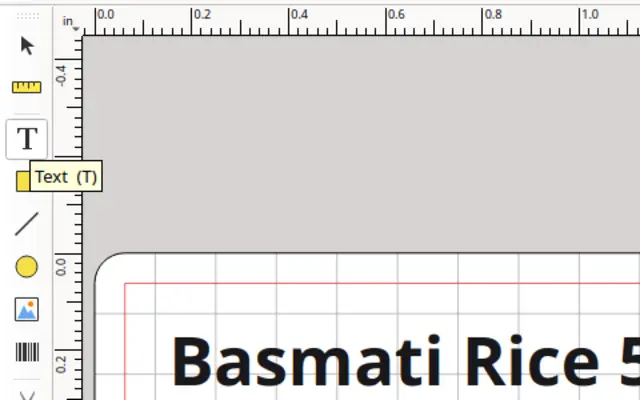
Tooltip on the Text tool showing its single-key shortcut T

Keyboard first

Every tool has a single key, shown when you hover. Change any shortcut in Tools > Keyboard Shortcuts.

T Text B Barcode M Measure

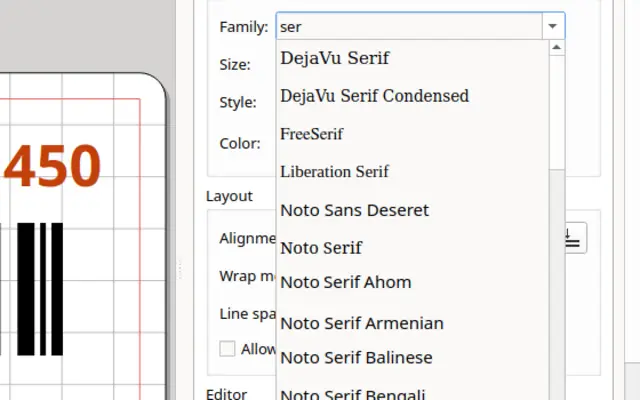
Font family box filtering to serif fonts, each shown in its own typeface

Quick font search

Type part of a font name to filter hundreds of fonts, each previewed in its own typeface.

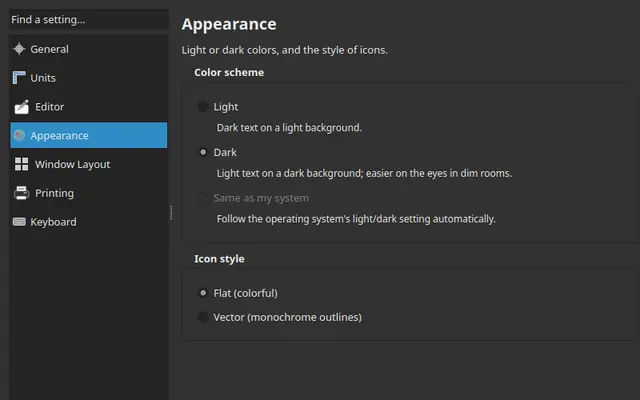
Preferences dialog in the dark color scheme with the Appearance page open

Light and dark themes

Light or dark colors, two icon styles and searchable Preferences. Work in in, mm, cm, pt or pc.

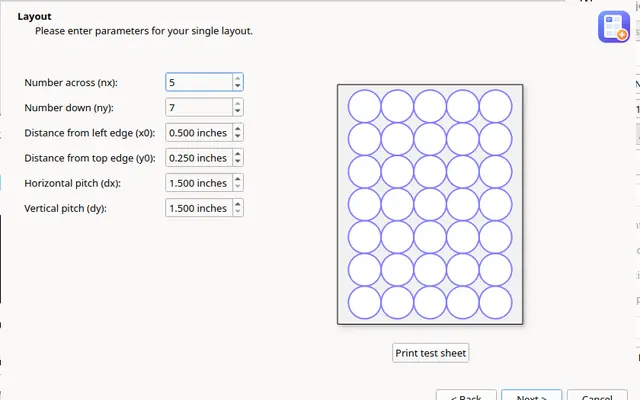
Product template designer setting up a sheet of round labels, 5 across and 7 down

Template designer

Create products that aren't listed yet: rectangular, round, CD/DVD and continuous roll labels.

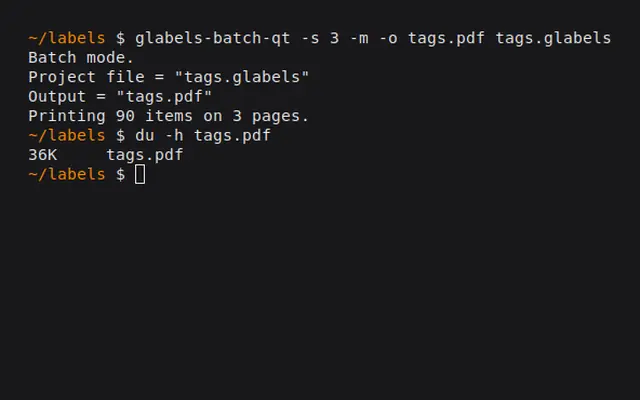
Terminal running glabels-batch-qt to export 90 labels on 3 pages to PDF

Command line printing

glabels-batch-qt prints or exports labels to PDF from scripts, without opening the app.

New in 5.1.4Design with Claude

Can I design labels with AI?

Yes. Connect Claude once in Tools > Connect AI > Claude and describe labels in plain words in the Claude chat panel. Claude works directly in gLabels Plus, so you see each change in the editor as it happens.

Optional, and your choice. It uses the Claude Code app installed on your computer with your own Claude account, or the Claude Desktop app. gLabels Plus has no AI service or subscription of its own. Your label goes to Claude only while you chat; everything else works offline. Included from version 5.1.4.

  • Start from a sentence: "a 4×6 shipping label with a tracking barcode" finds the right roll or sheet and lays out the whole label.
  • Edit by asking: bigger text, a new line, a QR code, a different label size. Claude changes only what you ask for.
  • Checks its own work: after each change Claude looks at a preview and fixes text that doesn't fit, overlaps and anything too close to the edge.
  • Symbols and logos: Claude uses the built-in symbols, your own SVG symbols and image files from your computer.
  • Live and undoable: every change appears in the editor at once and is a single Ctrl+Z step.
  • Save, open and PDF: ask Claude to save the label, open another one or export a PDF proof. It never replaces a file without asking you first.
  • A panel that fits your layout: dock the chat on any side of the window or float it, and show or hide it with Ctrl+Shift+K.
  • Safe by design: in the chat panel Claude can only use the label tools and read files. It cannot run programs or change other files.

01Designing labels

What can I put on a label?

  • Text, barcodes, QR codes, images, boxes, lines and ellipses on any label or card.
  • Curved text for round labels: choose Arc (top), Arc (bottom), Circle, Rectangle or Wave under Path in the Text tab, or draw a shape and use Objects > Put Text on Shape. Start angle turns the words round the curve and Distance from edge moves them in or out.
  • Put Text on Shape (Objects menu): select a text object and a circle, ellipse, box or line you drew, and the text follows its outline. The two are grouped so they move together.
  • Insert Symbol (Tools > Insert Symbol): 151 solid black symbols for thermal labels, including handling marks, food marks, contact icons, social media logos, delivery, check boxes and arrows. The window stays open while you add more.
  • Rulers along the top and left of the label. Click the corner to switch units.
  • Objects panel listing every object from top to bottom. Lock an object so it can't be selected or moved by accident.
  • Layer names and groups: give objects names (double-click or F2) and organize them into collapsible groups with Ctrl+G. Select a group to move, align or lock all of it at once.
  • Objects panel toolbar and right-click menu to rename, lock, duplicate, group, reorder and delete. Each button is enabled only when it applies to the selection.
  • Smart guides: while you move or resize, red lines show the distance to the nearest object or the label edge, in your chosen units. Objects snap to other objects' edges and centers and to the label; hold Ctrl to turn snapping off.
  • Measure tool (M): drag between any two points to measure, with snapping to object and label edges. Shift keeps the line horizontal or vertical.
  • Edit text in place: double-click a text or barcode object, or press Enter/F2, and type straight onto the label.
  • Quick font search: type part of a font name to filter hundreds of fonts, each previewed in its own typeface.
  • Urdu labels: the Noto Nastaliq Urdu font is built in, so Urdu prints in true Nastaliq on every computer, mixed freely with English, numbers and barcodes.
  • Live position and size tooltip that follows the cursor while you move, resize or draw.
  • Bring Forward / Send Backward one layer at a time, and a rotation box for exact angles.
  • Align to the selection, the last selected object, or the label itself. Hold Shift with the arrow keys to nudge in larger steps.

02Projects

How do I keep labels for different clients apart?

  • Group labels by business or client. Each project has its own list of labels on the welcome screen.
  • Create one with + New project... or File > New Project, then add labels with New label....
  • Right-click to rename, duplicate, show in folder or move to the Trash.
  • Each project is an ordinary folder in Documents/gLabels Plus Projects, easy to back up, copy or share.

03Pages and products

Which label sheets and sizes are supported?

  • Sample label library with 28 ready-made designs: 4×6 shipping label, 80 mm sales receipt, A4 invoice, SKU, product, barcode, sale price, asset tag, address, bin location, carton/pallet, food date and QR code labels. Open one with File > New from Sample or Start from a sample on the welcome screen.
  • 15 sticker labels in black and white for thermal printers, up to 4″ (101.6 mm) wide: round cookie, bakery and cottage food stickers with curved text, a square bakery product label, jam jar, oval honey jar, candle, soap, coffee bag, cake box, spice jar, thank-you, handmade seal and box seal designs.
  • A sample always opens as an untitled copy: edit the text, save it under a new name and print. The original stays as it was.
  • Save as Template adds your own designs to My templates, stored as ordinary files in Documents/gLabels Plus Templates.
  • Over 1,800 product templates from Avery, Herma, Zweckform, Brother, Dymo, Uline, Worldlabel and many more.
  • 24 barcode label presets for thermal roll printers in their own Barcode labels category.
  • Page selector in the toolbar and Edit > Page Setup (Ctrl+Shift+P): change the page at any time; objects keep their position and size.
  • Product chooser with search, grid and list views, favorites, recently used products and an Also sold as list of equivalent part numbers.
  • Product template designer for products that aren't listed, including roll labels.

04Mail merge and variables

Can I print bulk barcodes and labels from a CSV spreadsheet?

  • Merge from CSV and other text files: save your Excel or Google Sheets data as CSV and each row becomes a label.
  • Bulk barcodes: set a barcode's data to a CSV column and every row prints with its own barcode.
  • Live merge preview shows real records on the label, with First / Previous / Next / Last buttons.
  • User-defined variables for counters, dates and other values that change from label to label.

05Printing

What printing options are there?

  • Sheet and continuous-roll printing with a print preview.
  • Click a label in the preview to choose where printing starts on a partly used sheet; Shift+click to choose the last label.
  • Optional label outlines, crop marks and mirror printing, with defaults in Preferences.
  • Print to PDF, and glabels-batch-qt to print or export from scripts.
  • Ribbon & Label Cost Estimator (Tools menu): enter the label size, gap, labels per roll, ribbon length and prices in any currency, and get the label rolls and ribbons a job needs, the amount to buy and the cost per label. Labels across and direct thermal (no ribbon) are supported.

06Workspace

How can I customize the app?

  • Light and dark color schemes and a choice of icon styles.
  • Redesigned Preferences with a search box.
  • Show or hide toolbars and panels, and choose icon size and text style.
  • Units selector (in, mm, cm, pt, pc) and a zoom box that accepts typed values.
  • Startup splash screen, windows that always open maximized, and the gLabels Plus icon on every window.

07Keyboard shortcuts

What are the keyboard shortcuts?

Press a single key to pick a tool. Hover over a toolbar button to see its key, and change any shortcut in Tools > Keyboard Shortcuts.

  • VSelect
  • TText
  • RBox
  • LLine
  • OEllipse
  • IImage
  • BBarcode
  • MMeasure
  • EErase (delete) the selection

Specifications

Specs at a glance

System requirements

Linux
64-bit, any modern distribution
Windows
10 / 11, 64-bit
macOS
Versions supported by Qt 6
Printers
Any printer your OS can print to: laser, inkjet, thermal roll

Technology

Framework
Qt 6, C++20
Barcodes
glbarcode++, optional GNU Barcode, Zint, libqrencode
File format
.glabels (XML, gzip)
Merge sources
CSV and delimited text

Licence & support

Version
5.1.5
Licence
GNU GPL v3 or later
Price
Free, no trial, no account
Maintainer
Usman Saif
Support
GitHub Issues

Free and open source

Start designing your labels today

No sign-up, no trial, no watermark. Download, open and print.

Custom solutions

Need a customized barcode label printing solution?

I build label printing that fits the way your business works: custom label designs and templates, printing straight from your inventory, POS or ERP data, thermal printer setup (Zebra, TSC, Xprinter, Godex) and bilingual English and Urdu labels.

Contact me